
Your Gym Log, Upgraded — Ditch the Notebook for Good
RepTally turns your phone into a gym log that never gets lost, never smudges, and always knows what you lifted last week. Free for iOS and Android.
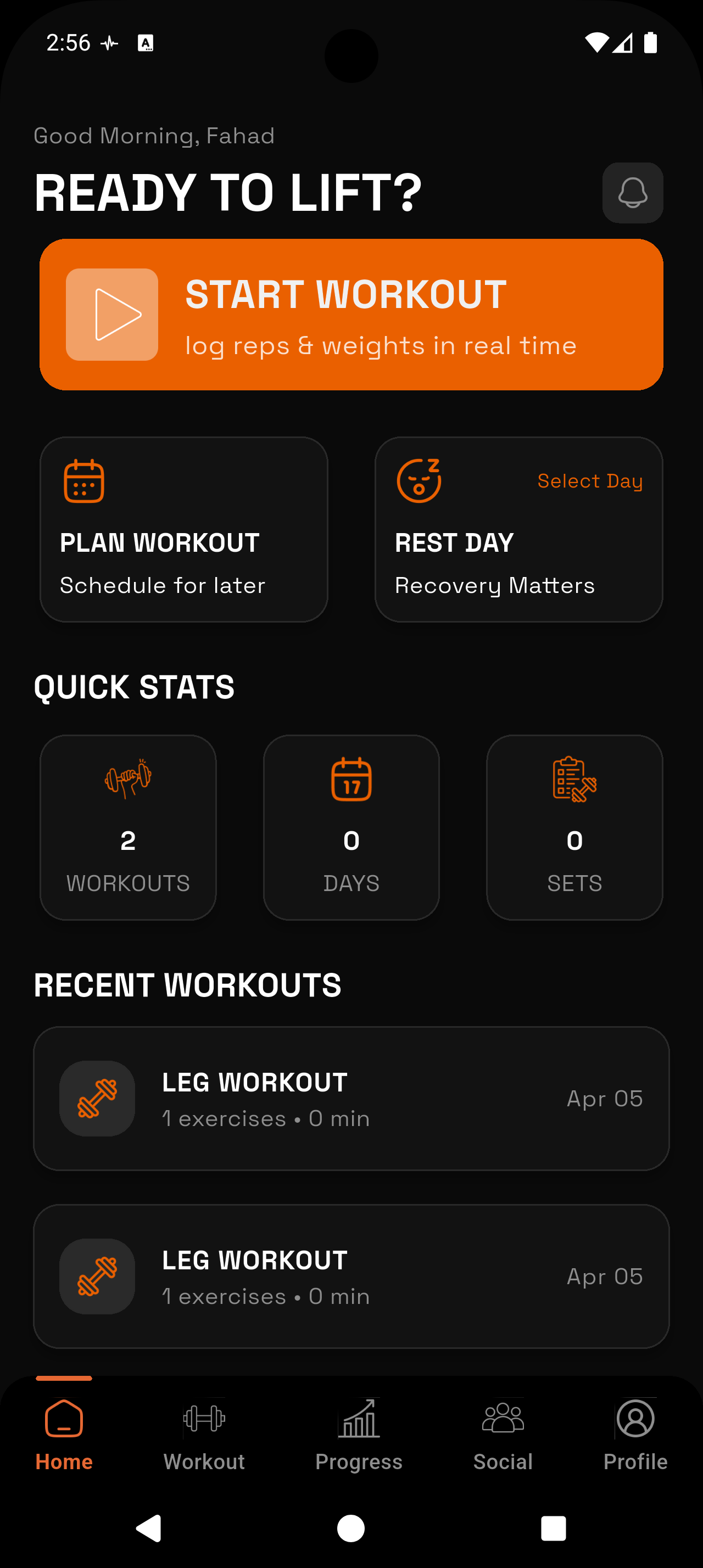
_1783546723734-CXKxCrzf.webp)
Never Lose Your Log
A paper notebook can be forgotten, soaked, or tossed out. Your workout history lives in RepTally and stays there — session after session, year after year.
Searchable in Seconds
Want to see what you squatted six months ago? Pull it up instantly. No flipping back through pages trying to find the right week.
Works Without Wi-Fi
Training in a basement gym with no signal? RepTally logs offline and syncs when you're back online. Just like paper, but better.
No More Smudged Pencil
Chalk-covered hands and a sweaty notebook are a bad combination. Tapping a weight into your phone is faster and leaves a cleaner record.
Automatic Personal Records
RepTally flags new PRs automatically. No more scanning through old entries trying to remember if that squat was a lifetime best.
Progress You Can Actually See
Visual charts show your volume, max weight, and estimated 1RM over time — something a paper log simply cannot do.
How It Works
Build your routine
Open RepTally and create a custom routine using your own exercises and splits. This becomes your starting template every time you walk into the gym — no writing out your plan by hand before each session.
Log your first set
Tap an exercise, enter the weight and reps, and mark the set — warmup, working, or failure. It takes a few seconds. Your previous session's numbers are shown right there so you know exactly what to beat.
Use the rest timer
Start the built-in rest timer between sets. No paper log has one. You'll stop guessing how long you've been resting.
Add notes if anything stands out
Leave a note on a specific exercise or the whole session — form cues, how you felt, why you dropped weight. The kind of detail that gets forgotten when you're just circling numbers on paper.
Check your history next session
When you come back, RepTally shows what you did last time. Pick up exactly where you left off and apply progressive overload without guessing.
Why Lifters Still Use Paper Gym Logs (And Why They Shouldn't)
The paper workout log has been around for as long as people have been lifting seriously. Old-school bodybuilders kept notebooks. Powerlifters tracked their lifts in spiral-bound journals. Coaches handed out printed templates. There's a reason the habit stuck — writing things down works.
But paper has real limitations. Notebooks get left at home. Pages get wet. Ink smears. You flip back looking for a weight from three months ago and spend five minutes hunting through crossed-out sets and scribbled-over numbers. And once a notebook is full, the history it holds is effectively dead — you're not cross-referencing two notebooks while you're under a bar.
A gym log app solves every one of those problems without changing the fundamental habit. You still record what you lift. You still track sets, reps, and weight. The difference is your data is organized, searchable, and with you on a device you already carry.
What a Good Digital Gym Log Actually Does
A gym log app should do exactly what a paper log does, but faster and without the friction. You show up, you log, you lift. That's it.
RepTally is built around that principle. When you open the app in the middle of a session, you're not hunting through menus. You select an exercise, enter the numbers, and get back to the bar. The interface is designed to stay out of your way.
Where RepTally goes further than paper is the data layer underneath. Every set you log feeds into charts that track volume over time, max weight per exercise, and estimated one-rep max. You can look at your bench press trend over the past year with a couple taps. That kind of context is what tells you whether your programming is actually working.
Offline Logging for Real-World Gyms
Not every gym has solid cell service. Basement gyms, commercial gyms with thick concrete walls, garage setups — signal can be unreliable or nonexistent. A paper log handles this without issue, and so does RepTally.
When you're offline, the app keeps working. You log your sets exactly the same way. When your phone reconnects, the data syncs. There's no gap in your history, no lost session.
This matters more than it might seem. If an app requires a connection to save data, you're one dead zone away from losing a session's worth of work. RepTally treats offline logging as a core feature, not an afterthought.
Tracking Sets Beyond Just Weight and Reps
A paper log usually has columns: exercise, set, weight, reps. Simple. RepTally keeps that simplicity but adds one useful layer — you can mark each set as a warmup, working set, or failure.
That distinction matters when you're reviewing history. Warmup sets at lighter weight shouldn't pull down your average. Knowing a set ended in failure tells a different story than just seeing the weight and reps. Over time, this gives you a cleaner picture of how your training is actually going.
- Warmup sets: logged separately so they don't skew your working set data
- Working sets: the core of your session, tracked for progressive overload
- Failure sets: recorded so you know when you pushed to the limit and can adjust accordingly
Personal Records and Workout Notes — The Details a Notebook Misses
One of the best things about keeping a gym log is seeing a PR when it happens. With a paper log, you have to remember to check your old numbers and manually confirm it's a best. RepTally does this automatically. When you hit a new max, the app flags it. No detective work required.
Workout notes are another place a digital log outperforms paper. You can attach a note to a specific exercise or to the entire session. Over time, these notes become genuinely useful data — you notice patterns, spot what conditions produce good sessions, and catch the form cues that work for you.
None of this replaces the actual lifting. But it gives you a complete record that you can learn from, something a smudged notebook with crossed-out numbers rarely provides.
Frequently Asked Questions
Train. Track. Tally.
RepTally is free to use. Download it today and start logging your workouts in seconds.